Hey everyone!
I’ve been building a setup to use my EN16 and VSN1 with Ableton Live 12, and it’s reached the point where it might be useful to others, so here it is:

What it does
- Two modes, switched with one key on the VSN1:
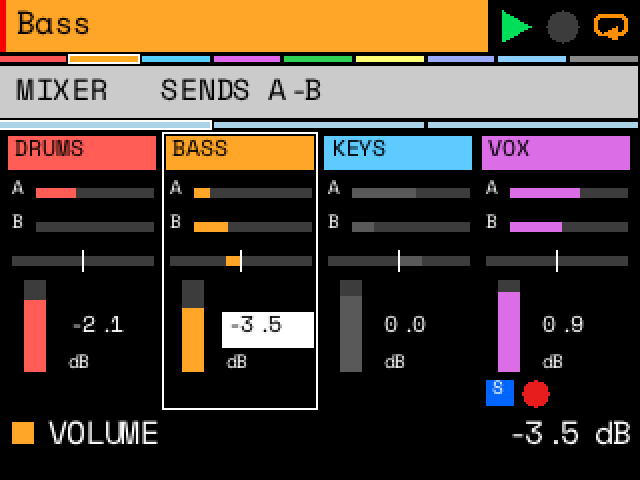
- Tracks: the EN16 becomes a 4-track mixer (two sends, pan and volume per column), with the LEDs in each track’s color.
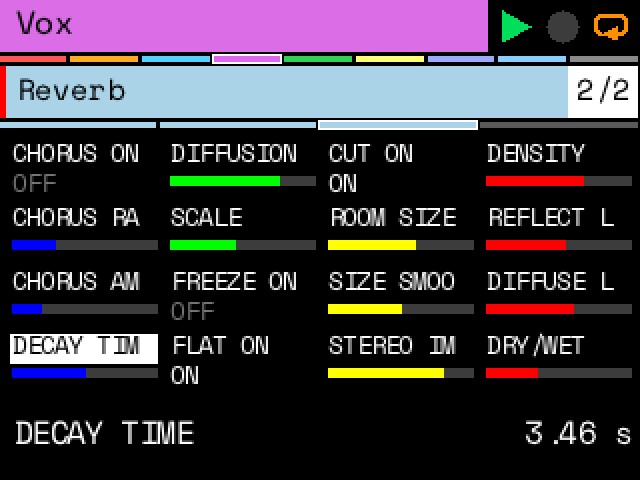
- Plugins: the EN16 controls the selected device, 16 parameters per page. It works with any Live device or plugin, and on/off parameters are detected automatically and switch with a press.
- The VSN1 screen mirrors the EN16: parameter names and values, channel strips in Tracks mode, and the last control you touched with Live’s own value text (“3.46 s”, “-6.0 dB”).
- Transport and navigation on the keys: play, record, loop, Session/Arrangement, previous/next track or device, and parameter pages.
- The jog scrubs the timeline. Tap it to set a play-start marker, and every stop jumps back there.
- Mount the EN16 any way round: it reports its rotation and the layout follows.
It’s a Python Remote Script plus generated Grid Editor profiles, and all the drawing happens in Lua on the VSN1. The repo has a tutorial with screenshots, and they’re rendered with the firmware’s own drawing code, so they show exactly what you’ll see on the screen.
Tested on macOS with Live 12.2.5 and Grid Editor 1.7.5. Windows should work, but nobody has tried it yet. If you’re on Windows, I’d love to hear how it goes!
It’s GPL-3.0 and I work on it in my spare time, so replies might take a while. Bug reports and ideas are very welcome. If you want to contribute code, please open an issue first so we can talk it through. And of course, feel free to fork it and take it your own way.
Saludos