I have 2 PFB4s that im using in Traktor. The issue I have is the port information sent just says…Grid. I have 2 Grid controllers, so traktor is getting this mixed up and thinks both are on the same port. I just want a way to differentiate the port of each controller but there’s no way to rename the port either in Traktor or Grid Editor. Is there anyway around this?
is there really no way to just rename the ports?
top quality support here
yeah. am i fuck buying another one of these controllers. dead ass community and support.
Hi there!
I’m usually the one commenting here on the team and was away on summer vacation the past week and a half, so apologies but I’m only getting to your post now. We’re usually quicker to respond on Discord as the community is more active there, but summertime can be quite slow…
Grids will be on the same port as long as they are connected with the same USB cable, AFAIK there is no way around that. If you want to differentiate the controllers, you should either switch up the CCs and Channels of their MIDI messages or use a second cable for the second controller.
If your problem is that you’re already using a second cable to connect the second Grid and the port is the same name in the Traktor application, I would still assume that Traktor doesn’t only look at the name of the port but its complete TSI and should be able to properly differentiate them.
If I misunderstood something, let me know, I’m not the most knowledgeable about Traktor.
im using 2 usb c cables. each decks commands are on a seperate channel. Deck A - channel 1. Deck B - channel 2. Traktor does not negotiate what port belongs to each deck. every time I open the programme one controller is on the wrong in/out ports and has to be reset. Issue isnt fixed by saving the TSI. It just sees Grid as the input port and constantly confuses them.
im gonna try contacting support as this forum is dead. If I cant get a reply im returning these things.
This is how any USB MIDI controller would work, if they have the very same CC / CH (MIDI) settings setup. The MIDI settings of the modules must be changed, at least their assigned channels so a mapping can be done and controllers be separately identified.
I would not complicate this setup with two USB cables in this case, as it is not deterministic which device enumerates first, when they get power at the same time… Or you must plug out each module and reconnect them in a specific order to have the same config at hand everytime.
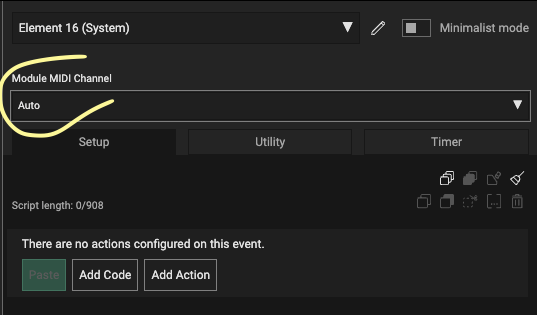
Quickest method to change the channel of a module is under system element, using the Module MIDI Channel setting: