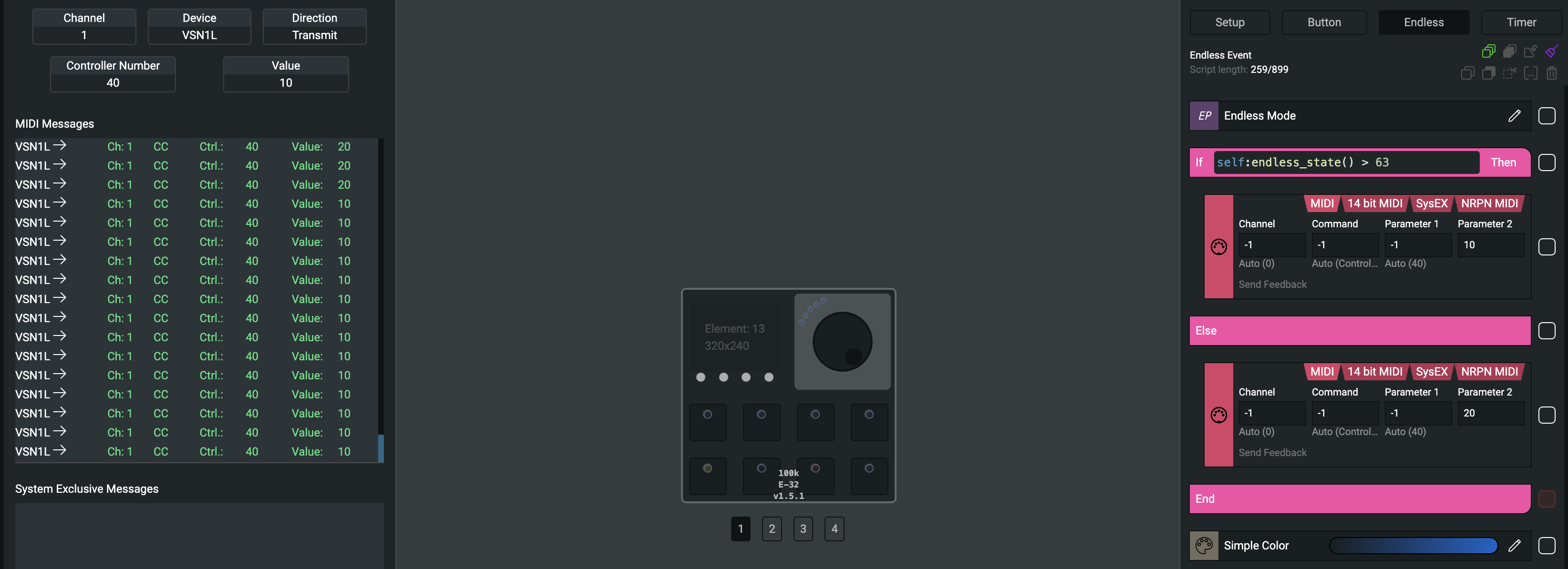
I am planning to use the TEK2 with CUBASE 15 PRO (on a Windows 11 25H2 OS). I’m finding my way around the GRID EDITOR software ok, and have set up the TEK2 buttons as I wish, but what I’m trying to do with the encoders is a little more demanding, as I wish to be able for them to control in both directions of rotation. CUBE does not allow bi-directional control on such function as ‘jog’ and ‘zoom’, which is what I am after. I’ve tried to use one of the posted presets (the DJ SETUP, Jogwheel 1 and 2) and I can adapt that and see that it each rotary is sending out a different range value (above 64 and below 64) depending on the rotation. I can also see in the code provided that there are ‘IF’ and ‘ELSEIF’ functions (I am not familiar with LAU coding, hence this request for help). Is there code I can input so that the encoder will then send out a different note or command depending on the value range (again, above 64 and below 64) … as then I could set up ‘two versions’ of the encoder in the CUBASE Midi Mapping for each direction of rotation on the encoder (based on the different note or command the TEK2 would output). Thanks …